The Email Preview Text (also known as a “preheader”) is the short snippet of text that appears immediately after your Subject Line in a recipient’s inbox.
When used correctly, this feature is one of the most effective ways to increase your Open Rates. It allows you to “hook” the reader before they even open the message, while simultaneously blocking the email body from leaking into the preview.
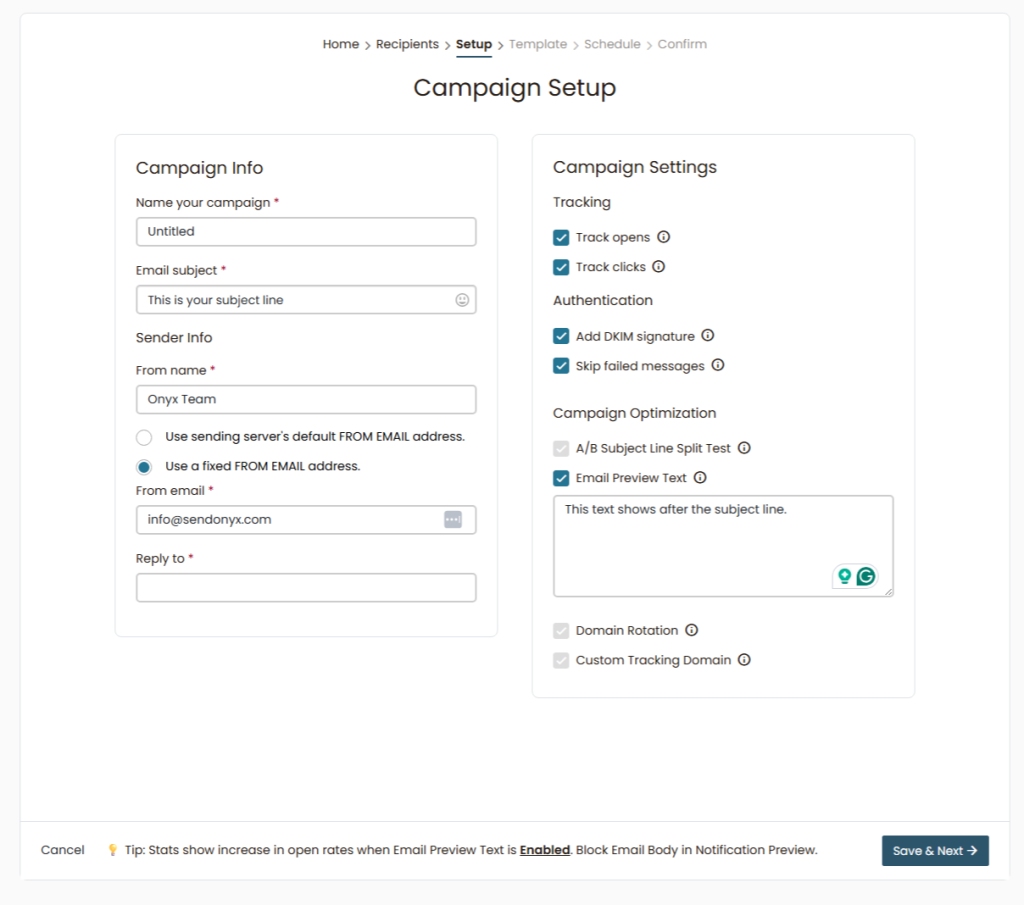
How the Email Preview Text Works
By default, email clients like Gmail, Outlook, and Apple Mail display the first few words of your email’s body text as a preview. Usually, this is something generic like “Hi there…” or “View in browser.”
The Onyx Advantage: When you enable Email Preview Text in SendOnyx, the system injects a hidden layer of text at the very top of your email.
- Curiosity Gap: You control exactly what the user sees in their inbox list.
- Body Block: It “pushes” the actual body of your email out of the preview area. This prevents the recipient from seeing the first line of your message, creating a “Curiosity Gap” that forces them to click to see the content.
How to Enable Email Preview Text
- Navigate to the Setup step of your Campaign Builder.
- On the right-hand side, under Campaign Optimization, check the box for Email Preview Text.
- A text box will appear. Type the specific “hook” you want to display in the inbox.
- Pro Tip: Keep it between 40-100 characters. Short enough to fit on mobile screens, but long enough to block the email body.
Strategies for High Conversion
- The “Cliffhanger”: Use the Subject Line for the statement and the Preview Text for the setup.
- Subject: I can’t believe she said this…
- Preview: I walked into the office and the first thing I saw was…
- The Benefit Reinforcer: Use the Subject for the “What” and the Preview for the “How.”
- Subject: $1,385 in 30 days.
- Preview: This new Onyx strategy is simpler than we thought.
- The Direct Call to Value:
- Subject: Your login details inside.
- Preview: Open this to access your new Apex Dashboard features.
Why it Increases Open Rates
Inboxes are crowded. By using a custom Preview Text, you are effectively giving yourself a second Subject Line. Because you are blocking the email body, the subscriber cannot “skim” the email from the outside. They have to open it to see what you wrote, which significantly boosts your engagement metrics.
Summary Checklist:
- [ ] Email Preview Text toggled “ON” in Campaign Optimization.
- [ ] Hook text entered (Curiosity-based).
- [ ] Checked against Subject Line for a seamless flow.
- [ ] Save & Next to proceed to the Template builder.
Don’t let Gmail decide what your preview looks like. Take control and spike your open rates.