In high-volume email marketing, relying on a single “From” email address can be a risk. If one domain faces temporary filtering, your entire campaign performance can drop.
Domain Rotation is a premium feature in SendOnyx that allows you to distribute your outgoing mail across up to three different email identities within a single campaign/broadcast. This keeps your sending “footprint” light and protects your long-term deliverability.
How Domain Rotation Works
When you enable Domain Rotation, SendOnyx will automatically cycle through your provided email addresses as it sends your broadcast.
Instead of sending 10,000 emails from info@domain1.com, the system will balance the load:
- Recipient 1: Sent from email 1
- Recipient 2: Sent from email 2
- Recipient 3: Sent from email 3
- The cycle repeats until the campaign is finished.
How to Set Up Domain Rotation (Step-by-Step)
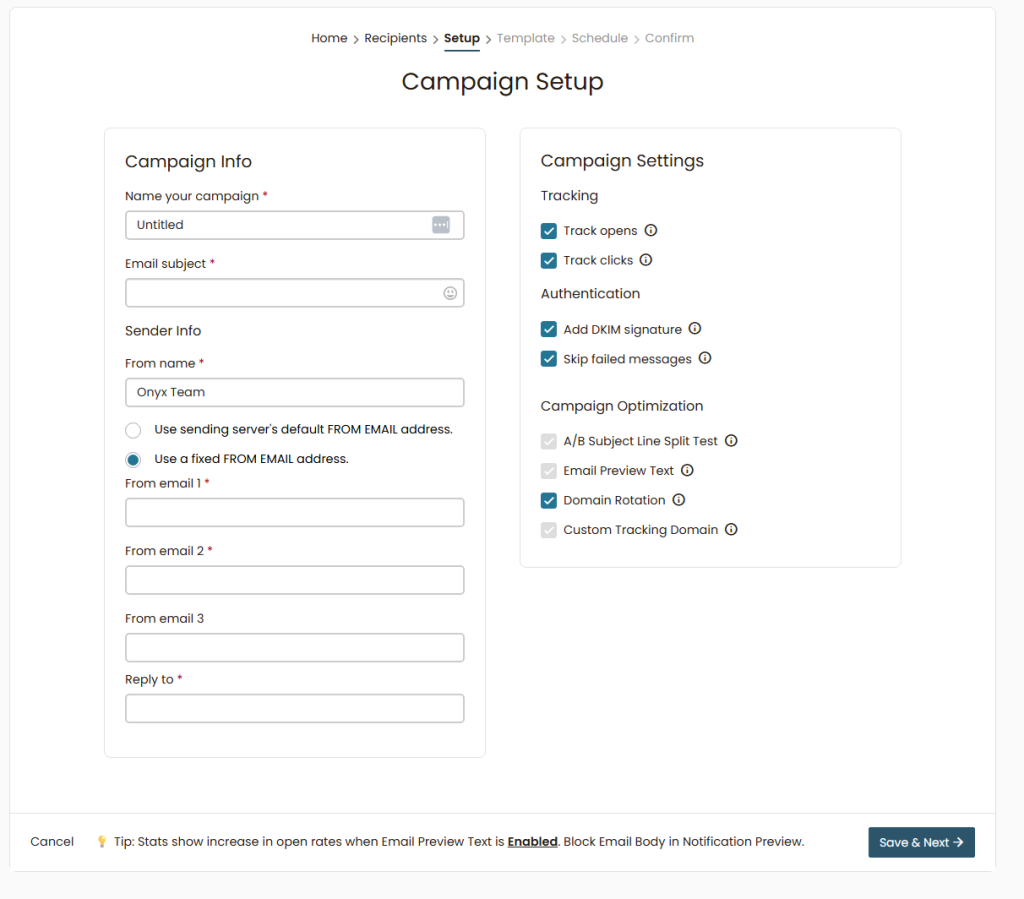
- Start Campaign Setup: Navigate to the Setup step in your Campaign Builder.
- Enable the Feature: On the right-hand side, under Campaign Optimization, check the box for Domain Rotation.
- Configure Sender Info:
- Select “Use a fixed FROM EMAIL address.”
- From email 1: Enter your primary sending address.
- From email 2 & 3: Enter your secondary and tertiary addresses.
- Consistency: Ensure your From name is consistent across all domains so your subscribers recognize you, regardless of which email address is used for that specific send.
- Authentication: Make sure all your sender domains are verified with Sendonyx and with your SMTP provider if you’re using a 3rd party SMTP.
Key Benefits for Apex Users
- Risk Mitigation: If one domain hits a temporary speed limit (throttling) by an ISP like Gmail, the other two domains in your rotation continue to deliver your message.
- Higher Daily Limits: By spreading the volume across three domains, you can effectively send a larger total volume per day while staying under the “danger zone” for each individual domain.
- Aggregated Stats: Even though you are using three different emails, SendOnyx tracks all opens and clicks in one unified report.
Best Practices
- Use Verified Domains: Ensure all email addresses used in rotation belong to domains that are fully verified (SPF, DKIM, DMARC) in your SendOnyx account.
- Keep Domains Related: For the best user experience, use similar domains (e.g.,
sasha@onyx-news.com,sasha@onyx-mail.com,sasha@onyx-updates.com). - Warmup is Required: Do not rotate a “cold” new domain with two established ones. All domains in the rotation should be properly warmed up using the 7-Day Warmup Protocol.
Summary Checklist:
- [ ] Domain Rotation checked in Campaign Optimization.
- [ ] Three valid “From” emails entered.
- [ ] DKIM Signature enabled.
- [ ] Consistent “From Name” applied.
Scale your volume with confidence by utilizing the power of Domain Rotation.