Statistically, over 70% of your subscribers will not open your first email. They might be busy, in a different time zone, or their inbox was simply too crowded at that moment. The Automatic Resend feature in SendOnyx allows you to schedule a follow-up broadcast to trigger automatically for specific segments of your audience, ensuring you get a “second chance” at the click without manual intervention.
How Automatic Resend Works
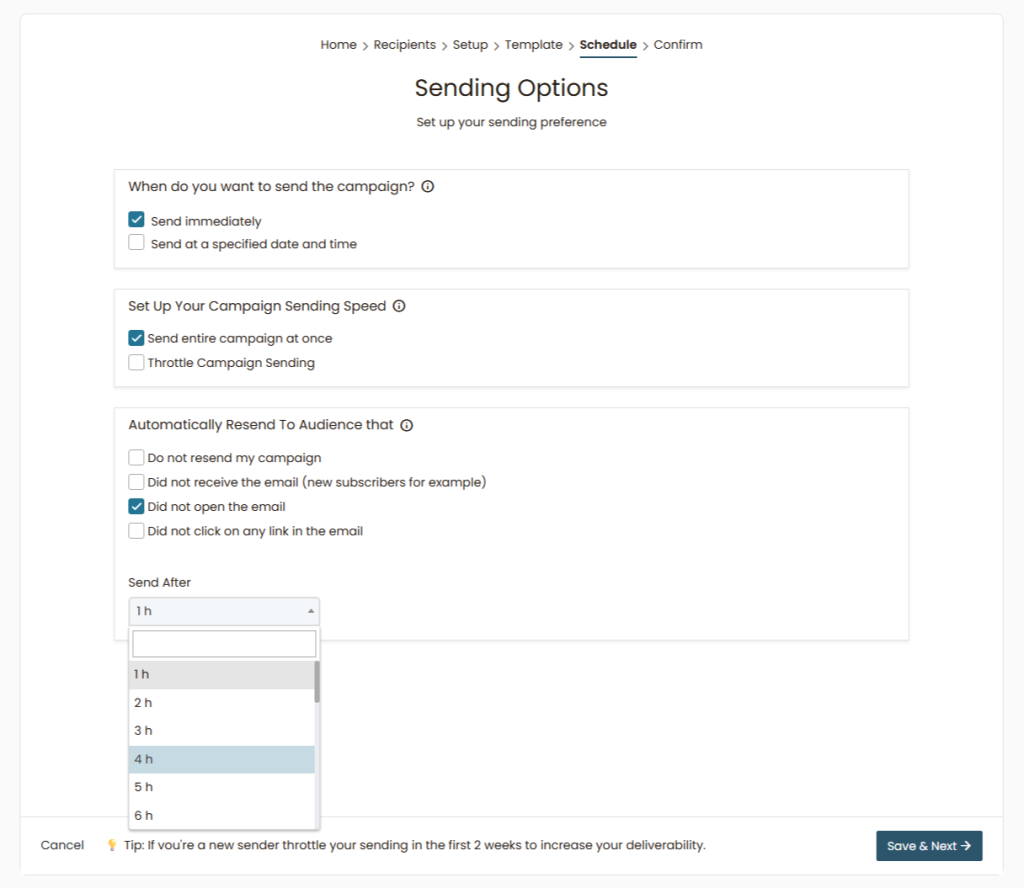
During the Schedule phase of your campaign setup, you can define logic that tells SendOnyx to monitor your initial broadcast and send a follow-up to those who didn’t engage.
Selecting Your Conditions
You can choose to automatically resend to subscribers who meet specific criteria:
- Did not open the email: Target those who missed your first hook entirely.
- Did not receive the email: Perfect for catching new subscribers who joined your list after the initial broadcast was sent.
- Did not click any link: Target those who opened the email but weren’t convinced enough to click.
Setting the “Send After” Timer
Timing is everything. You don’t want to resend too early and annoy your fans, but you don’t want to wait so long that the offer is cold.
- Select the Trigger: Check the box for your desired condition (e.g., “Did not open the email”).
- Choose the Delay: Use the Send After dropdown to select a delay, ranging from 1 hour to several days.
- Pro Tip: For most affiliate offers, a 24h to 48h delay is the “Sweet Spot.” It hits the inbox at a similar time the next day when the user might be more available.
Why This Feature is a “Profit Engine”
- Zero Manual Work: Set it once during the initial setup and let Onyx handle the tracking and the second blast.
- Boosted Open Rates: It is common to see a 30-50% increase in total unique opens by using a smart resend strategy.
- Improved Deliverability: By targeting only those who didn’t engage, you aren’t “spamming” your active openers, which keeps your engagement signals healthy with ISPs.
Best Practices
- Change the Subject Line: If they didn’t open the first one, the subject line didn’t work for them. When the resend triggers, try a different angle (use this in conjunction with your A/B Testing data!).
- Watch the Frequency: Don’t use “Automatic Resend” for every single daily broadcast, or you risk increasing your unsubscribe rate. Use it for your big “Money” offers.
- Throttle if Needed: If you are a new sender, remember the tip at the bottom of the page: Throttle your sending during the first 2 weeks to safely build up that reputation.
Summary Checklist:
- [ ] Condition selected (e.g., “Did not open”).
- [ ] “Send After” timer set to an optimal delay.
- [ ] Sending Speed (Throttle) checked for new accounts.
Stop leaving money on the table. Use Automatic Resend to capture the 70% of the audience you’re currently missing.