When you send an email with a link, your subscribers don’t just see your landing page URL. Behind the scenes, the email service provider (and ISP filters like Gmail) see a Tracking Link.
By default, many systems use a “shared” tracking domain. If one person on that shared domain sends spam, everyone’s links get flagged. SendOnyx Custom Tracking Domains solve this by giving you 100% isolation and total control over your reputation.
What is a Custom Tracking Domain?
A Tracking Domain is the URL used for your “Open” pixels and “Click” redirects. Instead of using a generic Onyx link, you use your own branded sub-domain (e.g., track.yourbrand.com).
Why You Must Use a Custom Tracking Domain:
- Brand Consistency: When a user hovers over a link in your email, they see your brand name, not a random string of characters. This builds trust and increases Click-Through Rates (CTR).
- Spam Filter Immunity: Shared tracking domains are “dirty.” Using your own clean domain ensures that your links don’t trigger “Suspicious Link” warnings in Gmail or Outlook.
- Domain Alignment: For the best deliverability, your From Email domain should match your Tracking Domain. This “Alignment” tells ISPs that you are a legitimate, organized sender, not a spoofed bot.
How to Set Up Your Tracking Domain
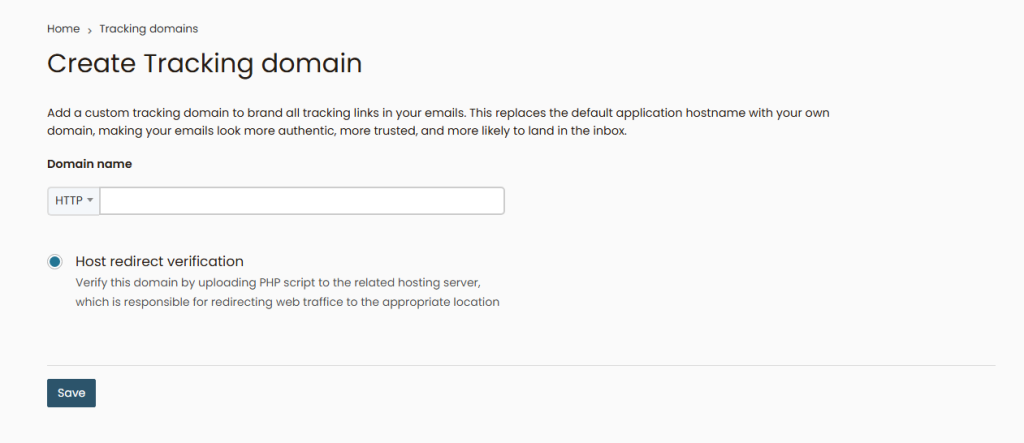
- Create a Sub-domain: In your cPanel or DNS provider (like Cloudflare), create a new CNAME record (e.g.,
clickortrack). - Point the DNS: Point that CNAME record to the SendOnyx tracking endpoint (provided in your Domain Settings).
- Verify in Onyx: Go to Settings > Tracking Domains and add your new subdomain. Once the status turns Green, it is ready for use.
- Select in Campaign: During your Campaign Setup, ensure your Custom Tracking Domain is selected.
Summary Checklist:
- [ ] CNAME record created in DNS.
- [ ] Domain shows “Verified” (Green) in Onyx.
- [ ] Tracking Domain matches your Sending Domain for perfect alignment.
Own your links. Own your reputation. Stop sharing your success with others.