The Audience Overview page is the pulse of your business. In email marketing, it’s not just about how many people you have on your list—it’s about how many of them are active, reachable, and profitable.
Here is a breakdown of the key metrics you’ll see in your Onyx Dashboard and Audience reports.
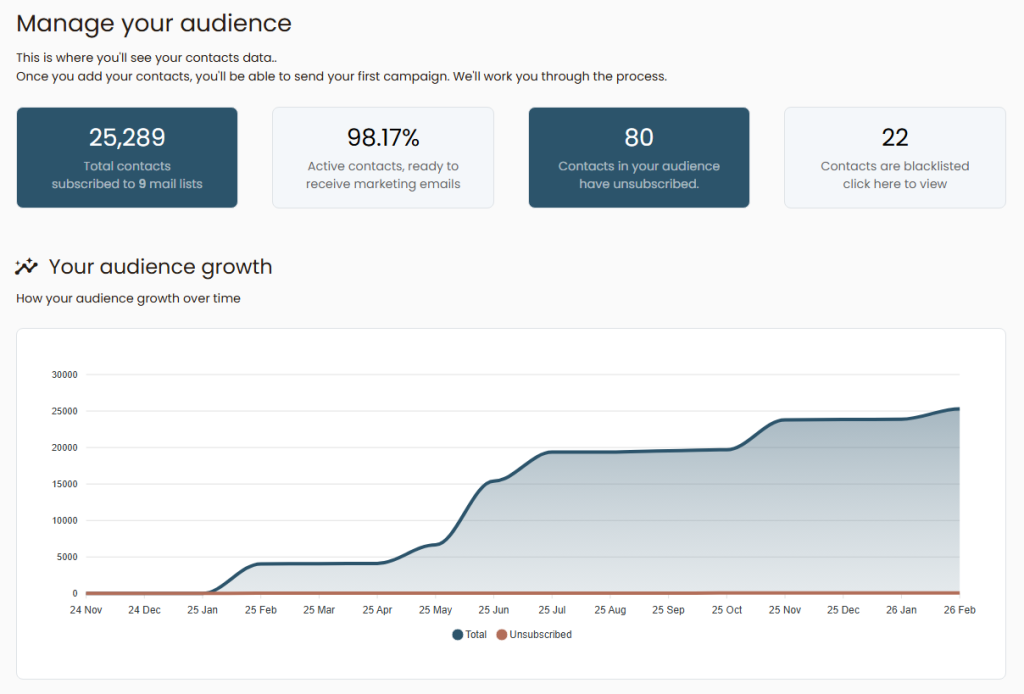
1. Total Subscribers
This is the “Grand Total” of every unique email address currently in your database across all lists.
- Why it matters: This number determines your scale. However, remember that SendOnyx only counts Active subscribers towards your plan limits. If a subscriber is unsubscribed or blacklisted, they are no longer “Active.”
2. The Growth Box (Last 30 Days)
Located at the top of your overview, this shows your momentum.
- Calculation: (New Signups) – (Unsubscribes + Bounces).
- Pro Tip: If this number is green and growing by at least 5-10% monthly, your acquisition strategy is working. If it’s stagnant, it’s time to build a new Onyx Bridge Page.
3. Unsubscribes
This metric shows users who have clicked your 1-Click Unsubscribe link
- Onyx Logic: Once a user unsubscribes, SendOnyx automatically “soft-deletes” them from active sending. You will still see them in your historical reports, but the system will never allow you to email them again by accident.
- Healthy Range: Anything below 0.5% per broadcast is considered excellent in the affiliate space.
4. Blacklist
This is your “Wall of Protection.” The Blacklist contains:
- Hard Bounces: Addresses that no longer exist.
- Spam Complaints: Users who marked your email as spam.
- Manual Additions: Emails you’ve added manually to ensure they never receive another message.
Why it’s Customer-centric: If a user is blacklisted in one list, they are blocked across your entire account. This protects your SMTP reputation and prevents you from being flagged by Gmail/Yahoo.
Understanding the “Unsub Rate vs. Bounce Rate”
- Unsubscribe Rate: A sign of content-market fit. If it’s high, your offers might not be relevant to your audience.
- Bounce Rate: A sign of list quality. If it’s high, your lead sources are “dirty” or old.
Summary Checklist:
- [ ] Check your Growth Box weekly to track momentum.
- [ ] Monitor the Blacklist for any sudden spikes (could indicate a bad lead source).